
Business & Tech Innovation · 01 Sept 2026
Samsung Wallet launches Scan to Pay in South Africa for faster QR code payments
[et_pb_section fb_built=”1″ theme_builder_area=”post_content” _builder_version=”4.27.8″ _module_preset=”default”][et_pb_row _builder_version=”4.27.8″ _module_preset=”default” theme_builder_area=”post_content”][et_pb_column _builder_version=”4.27.8″ _module_preset=”default” type=”4_4″ theme_builder_area=”post_content”][et_pb_text _builder_version=”4.27.8″ _module_preset=”default” theme_builder_area=”post_content” hover_enabled=”0″ sticky_enabled=”0″]
Samsung Wallet’s new Scan to Pay feature, powered by EFT Corp, lets Galaxy users make secure QR code payments at more than 600,000 locations across South Africa
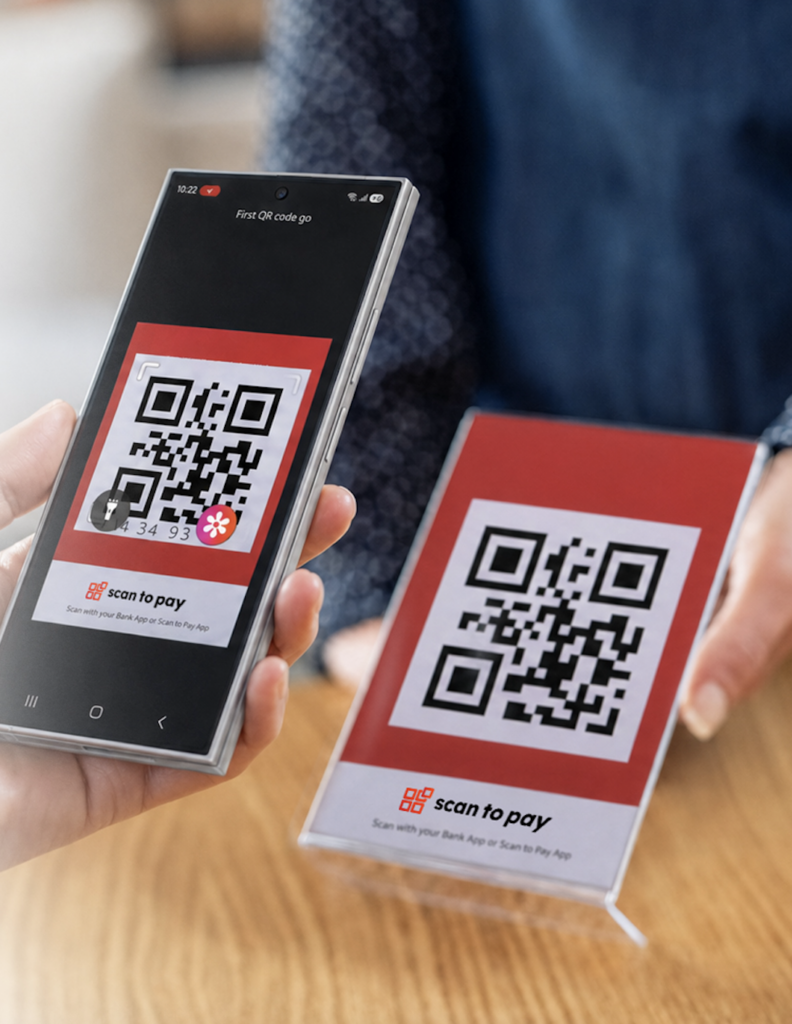
Samsung has introduced Scan to Pay in South Africa, a new QR code payment feature within Samsung Wallet that makes everyday transactions faster, simpler and more secure for Galaxy users.
Powered by EFT Corp, the feature allows users to pay by scanning a QR code at participating stores or online. The update expands Samsung Wallet’s growing ecosystem of digital payment solutions while offering an easy alternative to carrying physical bank cards.
How Samsung Wallet Scan to Pay works
Using Scan to Pay takes just three steps:
-
Open Samsung Wallet.
-
Scan the QR code.
-
Confirm the payment with biometric authentication.
The process removes unnecessary steps at checkout, making it easier to pay for coffee, groceries, meals and everyday purchases.
[/et_pb_text][/et_pb_column][/et_pb_row][et_pb_row _builder_version=”4.27.8″ _module_preset=”default” theme_builder_area=”post_content”][et_pb_column _builder_version=”4.27.8″ _module_preset=”default” type=”4_4″ theme_builder_area=”post_content”][et_pb_image src=”http://www.joburgstyle.co.za/wp-content/uploads/2026/09/image001.jpg” _builder_version=”4.27.8″ _module_preset=”default” theme_builder_area=”post_content” alt=”Samsung Wallet Scan to Pay” title_text=”Samsung Wallet Scan to Pay” hover_enabled=”0″ sticky_enabled=”0″][/et_pb_image][/et_pb_column][/et_pb_row][et_pb_row _builder_version=”4.27.8″ _module_preset=”default” theme_builder_area=”post_content”][et_pb_column _builder_version=”4.27.8″ _module_preset=”default” type=”4_4″ theme_builder_area=”post_content”][et_pb_text _builder_version=”4.27.8″ _module_preset=”default” theme_builder_area=”post_content” hover_enabled=”0″ sticky_enabled=”0″]
Available at over 600,000 locations across South Africa
The service is backed by Scan to Pay, one of South Africa’s largest alternative payment platforms.
The network includes:
-
More than 600,000 merchant acceptance locations nationwide.
-
Over 19 million app inclusions across banking, fintech and financial service provider applications.
The extensive reach means Galaxy users can increasingly rely on QR payments as part of their daily routine.
Samsung Wallet combines convenience with security
Security remains central to the experience.
Every Scan to Pay transaction is protected by Samsung Knox, the company’s defence-grade security platform. Payments also require biometric verification, adding another layer of protection before a transaction is approved.
The combination of QR convenience and built-in security allows users to complete purchases without needing to reach for a physical card.
Samsung’s focus on practical everyday innovation
According to Zahir Cajee, MX Lead: Product and Commercial at Samsung South Africa, the company continues to prioritise features that make everyday smartphone use more intuitive.
“Samsung doesn’t just focus on tech and AI innovation for Galaxy users. One of the core fundamentals within the product design process is having a deep understanding of what our users do with our devices, and importantly how we can make everyday usage more intuitive and easier. Our Wallet encompasses the true sense of what a Digital Wallet should be, and we will continue to add practical innovation within our Wallet functionality.”
The future of QR payments in South Africa
As contactless and digital payments continue to grow, Samsung’s latest Wallet update gives Galaxy users another practical way to pay quickly and securely.
Scan to Pay is now available within Samsung Wallet at participating merchants across South Africa, making QR code payments easier than ever.
[/et_pb_text][/et_pb_column][/et_pb_row][et_pb_row _builder_version=”4.27.8″ _module_preset=”default” theme_builder_area=”post_content”][et_pb_column _builder_version=”4.27.8″ _module_preset=”default” type=”4_4″ theme_builder_area=”post_content”][et_pb_social_media_follow _builder_version=”4.27.8″ _module_preset=”default” theme_builder_area=”post_content” hover_enabled=”0″ sticky_enabled=”0″][et_pb_social_media_follow_network social_network=”facebook” background_color=”#3b5998″ _builder_version=”4.27.8″ _module_preset=”default” follow_button=”off” url_new_window=”on” theme_builder_area=”post_content” url=”https://www.facebook.com/SamsungSouthAfrica” hover_enabled=”0″ sticky_enabled=”0″]facebook[/et_pb_social_media_follow_network][et_pb_social_media_follow_network social_network=”instagram” background_color=”#ea2c59″ _builder_version=”4.27.8″ _module_preset=”default” follow_button=”off” url_new_window=”on” theme_builder_area=”post_content” url=”https://www.instagram.com/samsungsa/” hover_enabled=”0″ sticky_enabled=”0″]instagram[/et_pb_social_media_follow_network][et_pb_social_media_follow_network social_network=”google” background_color=”#4285f4″ _builder_version=”4.27.8″ _module_preset=”default” theme_builder_area=”post_content” follow_button=”off” url_new_window=”on” url=”https://www.samsung.com/za/” hover_enabled=”0″ sticky_enabled=”0″]google[/et_pb_social_media_follow_network][/et_pb_social_media_follow][/et_pb_column][/et_pb_row][/et_pb_section]